Canva is free. Canva is easy to learn. And knowing how to make money with canva is one of the most realistic entry points into online income for anyone with no coding skills, no formal design training, and no budget to invest upfront.
The demand for visual content is enormous — and Canva puts the ability to meet that demand in the hands of any beginner willing to learn it.
Millions of businesses, content creators, bloggers, and entrepreneurs need visual content every single day — social media graphics, logos, presentations, flyers, eBook covers, YouTube thumbnails, and hundreds of other design assets. Most of them cannot afford a professional designer for every piece of content. That gap is exactly where knowing how to make money with Canva becomes genuinely valuable.
I used Canva extensively while building Vestes — for product graphics, promotional materials, and content assets. What struck me immediately was how much professional-looking output a complete beginner could produce with just a few hours of practice. The same tool that helped me build a brand is the tool this guide will show you how to monetise.
🎨 Why Canva Is Perfect for Making Money Online
Before the seven methods, it helps to understand why Canva specifically is such a strong tool for earning online — not just any design software.
Canva is free at its core. The free plan includes thousands of templates, a large stock image library, and all the fundamental design tools most people will ever need. You do not need Canva Pro to start earning — Pro adds extra features but the free version is enough to produce professional, sellable work from day one.
Canva’s learning curve is negligible compared to Photoshop or Illustrator — which is precisely what makes how to make money with canva so beginner-friendly. Most beginners go from zero to genuinely good-looking work within a few hours.
This low barrier to entry is what makes how to make money with canva more accessible than any other creative income path available online.
Canva also outputs files in every format buyers need — which removes one of the biggest friction points in how to make money with canva as a service provider — PNG, JPG, PDF, MP4, GIF — which means you can serve clients across every platform without additional software or conversion tools.
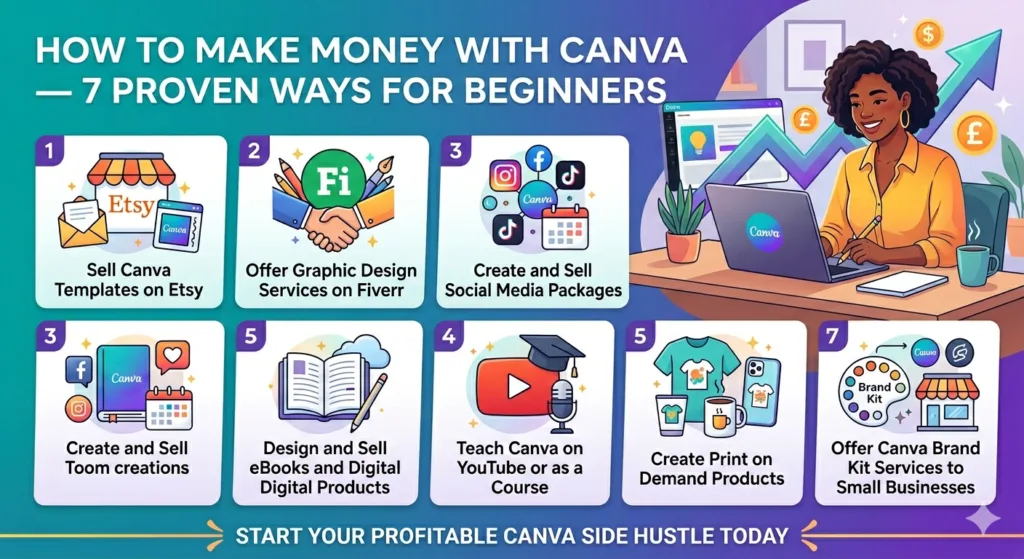
💼 Way 1 — Sell Canva Templates on Etsy
Selling templates on Etsy is one of the most popular and scalable methods of how to make money with canva — and for good reason. You create a template once and sell it unlimited times. Every sale after the first is essentially pure profit with no additional work.
The best-selling Canva template categories on Etsy include social media post templates, Instagram story sets, business cards, presentation decks, resume templates, and planner pages. Prices typically range from $5 to $35 per pack.
A well-designed template set with strong Etsy keywords can generate 10 to 50 sales per month completely passively once it ranks.
To sell Canva templates on Etsy, you create the design, then deliver a shareable Canva link. Buyers click it, copy the template to their own account, and customise it.
Setup takes about 30 minutes once you understand the process — making it one of the most beginner-friendly passive income streams in how to make money with Canva.
🖥️ Way 2 — Offer Graphic Design Services on Fiverr
Fiverr is the fastest route to actual cash when learning how to make money with canva — and it requires nothing more than a free account and a working internet connection. Rather than waiting for passive sales to build up, you offer graphic design services directly to buyers who need work done today.
Popular Canva-based services on Fiverr include social media post design, YouTube thumbnail creation, logo design, business presentation design, flyer and poster creation, and eBook cover design. These services start at $10 to $25 for basic packages — achievable for a beginner within the first few orders.
The key advantage of Fiverr for how to make money with Canva is speed. Your first client can arrive within days of publishing a well-written gig — unlike Etsy templates which take weeks to build search traffic.
Read our post on how to get your first order on Fiverr for the full breakdown of setting up and optimising your gig from scratch.
📱 Way 3 — Create and Sell Social Media Packages
Small businesses and personal brands need consistent social media content constantly — and most do not have the time to create it. This is one of the highest-demand applications of how to make money with canva in 2026.
A social media content package typically includes 15 to 30 designed posts per month — branded graphics, quote cards, promotional posts, and story templates — delivered in the client’s brand colours and fonts. Packages like these sell for $150 to $500 per month depending on volume and platform.
Canva makes delivering this service genuinely efficient. You create brand templates once using the client’s colours, fonts, and logo, then produce monthly content quickly by editing those templates. What takes a non-designer hours takes you 20 to 30 minutes per post once your workflow is established.
One client at $200 per month is $2,400 per year — a strong return on the Canva skills you build learning how to make money with canva through service delivery. Three clients is $600 per month — a strong part-time income built entirely on how to make money with Canva without any professional design background.
📚 Way 4 — Design and Sell eBooks and Digital Products
Canva is the best free tool available for creating professional-looking eBooks, workbooks, planners, and digital guides — which is why this method of how to make money with canva has grown so fast — all of which sell as digital downloads on platforms like Gumroad, Etsy, and Payhip.
The process for this method of how to make money with Canva is straightforward. Choose a topic you know well. Use Canva’s document templates to design a visually appealing eBook or workbook. Export as a PDF. List it for sale on Gumroad or Etsy at $7 to $27. Promote it through social media or a simple blog post.
A 20-page actionable guide on a topic with genuine demand — “The Beginner’s Guide to Freelance Writing” or “30-Day Social Media Content Calendar” — can sell for $12 to $20 and generate income for months or years after a single weekend of creation. The more specific and useful the content, the better it sells.
🎓 Way 5 — Teach Canva on YouTube or as a Course
Teaching others is one of the most scalable ways of how to make money with canva once you become proficient with the tool — because the same knowledge earns multiple times through different income streams simultaneously.
A YouTube channel dedicated to Canva tutorials — showing beginners how to design logos, social media posts, presentations, and templates — targets an enormous audience of small business owners and content creators who want to learn the tool. YouTube AdSense income plus affiliate commissions from Canva Pro referrals creates a compounding income stream from content you create once.
A short Canva course on Udemy — covering the platform from beginner to proficient — can generate $200 to $800 monthly in royalties.
It is one of the most scalable forms of how to make money with canva once your skills are solid. The startup cost is zero and the recording equipment needed is a laptop with a built-in microphone. The startup cost is zero. The recording equipment needed is a laptop microphone and screen recording software, both available free.
🛒 Way 6 — Create Print on Demand Products
Print on demand is one of the most naturally aligned methods of how to make money with canva because Canva produces exactly the design formats these platforms need because Canva is the perfect tool for creating the designs that go on products like T-shirts, mugs, tote bags, phone cases, and posters.
Platforms like Redbubble, Printful, and Merch by Amazon handle all production and shipping. You design the artwork in Canva, upload it to the platform, and earn a royalty on every sale. No inventory, no upfront cost, no order fulfilment.
The key to print on demand success in how to make money with Canva is niche targeting. Generic designs compete against thousands of similar products and rarely stand out.
Niche designs — for specific hobbies, professions, or communities — face less competition and attract buyers with strong purchase intent. A design for a specific niche consistently outsells a generic design targeting everyone.
🤝 Way 7 — Offer Canva Brand Kit Services to Small Businesses
Many small businesses and startups have no visual brand identity — no consistent logo, colours, fonts, or graphic style. Helping them build one using Canva’s Brand Kit is a premium service built entirely around how to make money with canva at a higher price point.
A basic brand kit service includes a primary logo, colour palette, font selection, business card design, and a set of branded social media templates — all delivered through Canva so the client can manage their own content going forward. This service typically sells for $150 to $500 as a one-time package.
The value proposition for clients is clear — they get a professional brand identity without hiring a $2,000 design agency. For you, it is a high-ticket service built entirely on free tools. Once you have completed three or four of these packages, the work becomes systematised and each new client takes fewer hours to deliver.
For more tools that support this kind of freelance service business, read our post on the best free tools for freelancers working from home — Canva sits alongside several other tools that collectively enable a complete professional operation at zero monthly cost.
🔑 The One Mistake Beginners Make With Canva Income
The most common mistake people make when starting how to make money with canva is spreading across too many methods at once. They open an Etsy shop, create a Fiverr gig, start a YouTube channel, and launch a print on demand store — all in week one. None of them gain traction because the effort is too diluted.
Pick one method from this guide and commit to it for at least 60 days before adding a second. If you choose Fiverr, spend those 60 days optimising your gig, improving your portfolio, and landing your first five reviews. If you choose Etsy, spend those 60 days creating 20 high-quality template listings with strong keywords.
Depth before breadth is the principle that separates people who actually earn from Canva from those who dabble across multiple methods and earn from none. How to make money with canva is genuinely possible for beginners — but only if the effort goes deep enough in one direction to produce visible results.
💰 Realistic Earnings From Canva in 2026
Here is an honest income breakdown for each method of how to make money with Canva at different stages:
- Etsy templates: $0–$50/month in month one, $100–$500/month by month six with 20+ listings
- Fiverr design services: $50–$200/month in month one, $300–$800/month by month three with reviews
- Social media packages: $150–$600/month with just one to three clients
- eBook and digital products: $20–$100/month initially, growing with traffic
- YouTube tutorials: $0 for months one to nine, then $100–$600/month compounding
- Print on demand: Slow start — $20–$100/month by month three with 50+ designs live
- Brand kit services: $150–$500 per client — one client per month is $1,800–$6,000 annually
The most effective starting approach for how to make money with canva is Fiverr for immediate income while simultaneously building Etsy templates for passive income in the background. These two methods complement each other perfectly — one pays fast, the other builds slowly and compounds.
🚀 Getting Started With Canva This Week
The fastest way to start how to make money with Canva is to open a free Canva account at canva.com and spend two to three hours exploring templates in your niche.
You do not need to be a skilled designer. Canva’s templates do the heavy lifting. Your job is to customise them, maintain brand consistency, and deliver work that looks professional to clients who know nothing about design.
Create your first product or service this week — that first step separates people who actually learn how to make money with canva from those who only read about it.
Whether that is your first Etsy listing, your first Fiverr gig, or your first pitch to a local business — take action rather than spending more time researching. Every day spent planning instead of shipping is a day of potential income lost.
For a complete picture of online income strategies that work alongside Canva skills, read our post on how to make passive income online as a beginner — Canva-based income fits perfectly into a broader passive income strategy — and how to make money with canva is one of the most practical entry points available.
❓ Frequently Asked Questions
Do I need Canva Pro to make money with Canva?
No — and this is one of the most reassuring facts about how to make money with Canva for beginners. The free plan includes thousands of templates, a stock image library, and all core design tools needed to create sellable work.
Canva Pro adds useful extras like background removal and more templates — but is not required to start earning. Start with the free plan and upgrade only once your Canva income justifies the cost.
How long does it take to start earning from Canva?
The timeline for how to make money with Canva depends entirely on which method you choose. Fiverr is fastest — a first paid order can arrive within days of a well-optimised gig.
Etsy template sales typically take four to eight weeks to build search visibility. Print on demand takes three to six months for consistent earnings. Teaching Canva on YouTube is a twelve-plus month journey before meaningful AdSense income begins.
Can I sell Canva designs commercially?
Yes — Canva’s licence allows commercial use of designs you create, including selling them to clients. The key restriction is that you cannot sell Canva’s own stock elements as standalone downloads.
When learning how to make money with Canva through template sales, ensure your templates contain enough original customisation to constitute an original work rather than a barely-modified default.
What Canva skills do I need to start making money?
The skills required for how to make money with Canva are accessible for complete beginners. You need to customise templates, work with brand colours and fonts, export in the right formats, and create clean layouts.
All of these can be learned through Canva’s free tutorial library and YouTube within one to two weeks of focused practice. No formal design education required.
Is the Canva template market too saturated on Etsy?
The general Canva template market on Etsy is competitive — but niche categories within it are not. This distinction is critical for how to make money with Canva through Etsy.
Generic Instagram templates face thousands of competitors. A set specifically for yoga studios, real estate agents, or bakeries faces far fewer. Niche-specific templates consistently outperform generic ones because buyers have stronger purchase intent and fewer competing results to choose from.
Can I use Canva on a smartphone to make money?
Yes — Canva has a fully functional mobile app for iOS and Android. For social media posts and basic templates, the mobile app is entirely sufficient.
For multi-page presentations, eBook layouts, or detailed brand kits, the desktop version is significantly easier. Most people learning how to make money with Canva use desktop for production work and mobile for quick edits on the go.